
 doc2.0
Online Monitor
Overview
The screen is located in “Tools” – “Monitoring” section. This screen displays information about various errors that usually require quick response, as well as the options to subscribe for notifications about any errors via Telegram  or Email
  . E-mail address are taken from the personal account (Manager or its employee account).
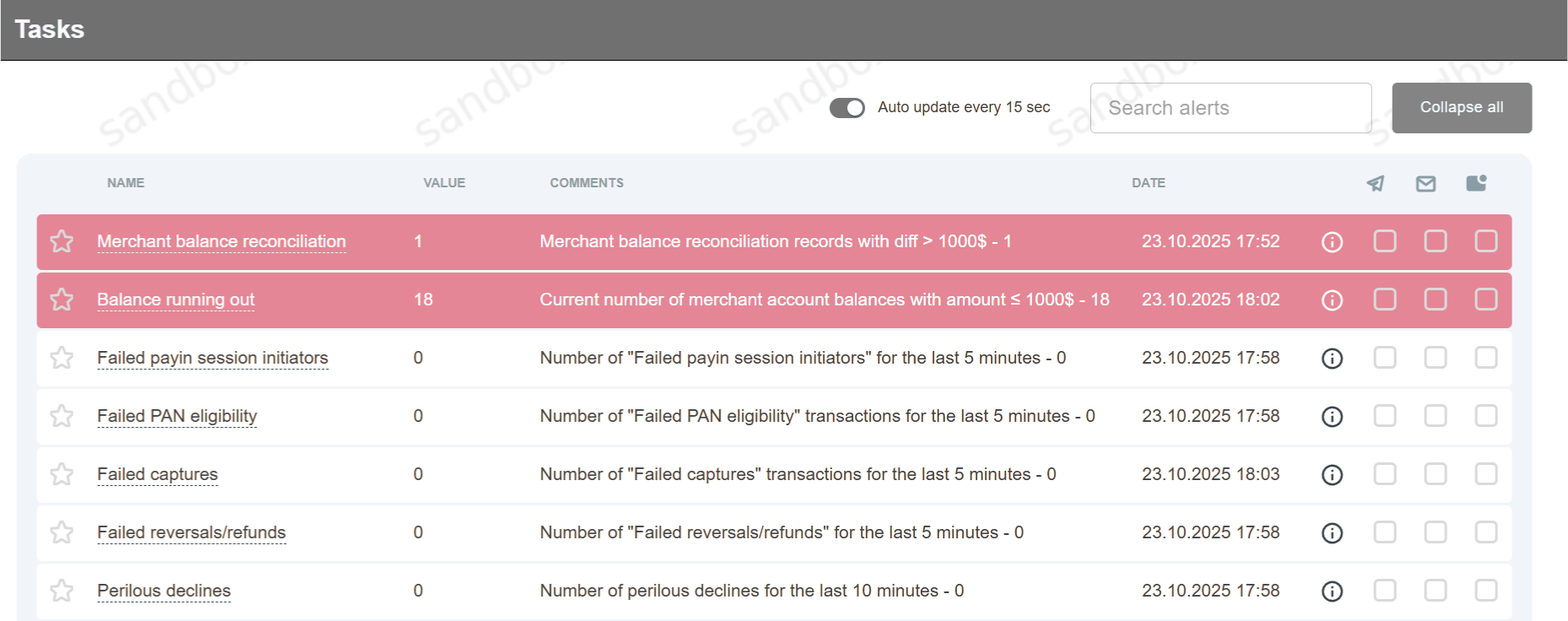
| Category | Monitor name | Description |
|---|---|---|
| Merchant Balances & Reconciliation | Balance Running Out | Fires when a merchant’s balance (Merchant Live balance) is less than or equal to 1000. The monitor value is the number of merchants whose balance is ≤ 1000. |
| Merchant balance reconciliation | Number of merchant balance reconciliation records where the discrepancy (diff) exceeds $1000. | |
| Merchant balance buffer queues | Number of records in the merchant balance recalculation buffer that have been “stuck” there for more than 1 hour. | |
| Last updates of BIN ranges | Monitors how long ago the BIN range reference table was last updated, per card scheme. Shows the card schemes (e.g. Mastercard, Visa) whose data was last updated more than 5 days ago, together with the last-update date for each. | |
| Processing Queues & Buffers | Auto-return queue | Current number of unprocessed auto-returns (auto-return). |
| Auto-capture queue | Queue of auto-capture operations awaiting processing. | |
| Job buffer Delay | Maximum job processing delay, in minutes. | |
| Job buffer Queue | Number of jobs waiting in the processing queue. | |
| Jobs awaiting processing | Number of jobs awaiting processing (system-wide). | |
| Processing Limits | Current processing limit values/status for merchants or processors. | |
| Processing Limits change queue | Length of the Processing Limits change queue. | |
| Processing Limits sync queue | Length of the Processing Limits synchronization queue. | |
| Tevt buffer Queue | Number of TEVT records in the buffer (awaiting processing/dispatch). | |
| Transactions buffer Queue | Number of transactions awaiting calculation in OLAP (general data). | |
| Transactions decline buffer Queue | Number of transactions awaiting decline-data calculation in OLAP. | |
| Transactions reason buffer Queue | Number of transactions awaiting transaction-reason data calculation in OLAP. | |
| Hang-up batch transactions | Number of “stuck” (hung) batch transactions. | |
| CMS Buffers | CMS buffer for level recalculate delay | Maximum delay, in minutes, for recalculating the customer level in the buffer. |
| CMS buffer for level recalculate queue | Number of records in the queue for recalculating the customer level (CMS). | |
| CMS buffer for merchant deletion | Number of merchants in the CMS deletion queue. | |
| CMS buffer for update level delay | Maximum delay, in minutes, for updating the customer level (CMS) in the buffer. | |
| CMS buffer for update level queue | Number of records in the queue for updating the customer level (CMS). | |
| Recurring Payments | Recurring Payment actions Delay | Maximum processing delay for recurring payment actions, in minutes. |
| Recurring Payment actions New | Number of new recurring payment actions. | |
| Recurring Payment actions Queued | Number of recurring payment actions waiting in the queue. | |
| Recurring Payment queue | Length of the Java processing queue for recurring payments. | |
| Recurring Payment queue Delay | Processing delay of the Java recurring-payments queue, in minutes. | |
| Recurring Payment schedule Auto | Number of automatic recurring payments (Auto RP) awaiting scheduled processing. | |
| Recurring Payment schedule Force | Number of forced recurring payments (Force RP) awaiting processing. | |
| Security & Validation | Stolen cards | Monitors transactions on stop-list/stolen cards (details unknown — the Comments field is empty). |
| Pending 3d validating sessions | Number of 3-D Secure sessions awaiting validation. | |
| Unauthorized access | Tracks suspicious API activity: repeated calls to entity-verification methods (check_company, check_dealer, check_end_point, check_end_point_group, check_gate, check_manager, etc.) by the same user within a short time span. The Comments field shows which user, which method, how many times it was called, and the time of the last call. | |
| Declines, Rejections & Filters | Perilous Decline | Shows triggered “perilous declines” — the list is maintained by the Manager on the Processor Error Codes page. |
| Important Filters | Counts filter errors that can be configured for notifications: card-usage frequency by email/IP, interval between approved transactions on a card, and the card’s daily usage limit. | |
| Critical declines | Number of critical declines over the last 5 minutes. | |
| Disabled scheduled adjustments | Disabled scheduled adjustments is necessary to receive notifications when automatic adjustments are disabled due to a negative balance or merchant deactivation. | |
| Decline ratio | Current percentage/ratio of declined transactions. | |
| Failed cancels | Number of failed cancel operations. | |
| Failed captures | Number of failed capture operations. | |
| Failed PAN eligibility | Number of failed PAN eligibility checks. | |
| Failed payin session initiators | Number of failed pay-in session initiations. | |
| Failed payout session initiators | Number of failed payout session initiations. | |
| Failed reversals/refunds | Number of failed reversals/refunds. | |
| Failed scorings | Number of failed scoring operations. | |
| Reference Data & Entity Synchronization | Currency upload | Monitors currency upload/update (details unknown — the Comments field is empty). |
| End points | Number of endpoint updates. | |
| End points first transaction | Number of endpoints for which a first transaction has been recorded. | |
| Gates | Number of gate (Gates) updates. | |
| Managers | Number of new managers. | |
| Merchants | Number of merchant updates. | |
| Merchants first transaction | Number of merchants for which a first transaction has been recorded. | |
| Merchant activity | Merchant activity indicator (details unknown — Comments is empty; needs confirmation from the team). | |
| Processors | Number of processor updates. | |
| Projects | Number of project updates. | |
| Routing | Inactive banks used in routing | Current number of inactive banks used in Routing & Balancing. |
| Inactive BIN ranges used in routing | Current number of inactive BIN ranges used in Routing & Balancing. | |
| System & Infrastructure | Day closing failed | Alerts on a failed operational day-close. |
| Job event Errors | Number of errors in job events. | |
| Job processor Stats | Job processor statistics (details unknown — the Comments field is empty). | |
| Message servers statistics | Message server statistics (details unknown — the Comments field is empty). | |
| Replication status | Current number of replication errors. | |
| Scheduler errors | Number of scheduler errors. | |
| Unknown sql exceptions | Current number of unknown SQL exceptions. | |
| Inaccessible Processors | Monitors inaccessible processors (details unknown — the Comments field is empty). | |
| Inaccessible PSPs | Monitors inaccessible payment service providers (PSPs) (details unknown — the Comments field is empty). | |
| Inconsistent order statuses | Monitors orders with inconsistent statuses (details unknown — the Comments field is empty). | |
| Last transaction | Date and time of the last recorded transaction in the system. |
Perilous Decline
Important Filters
Notifications can be created for cases in which transactions were filtered due to the one of the following filters:
Source Credit Card Number usage frequency for Email or IP address
Total Credit Card Number usage frequency for last 24 hours (daily limit)
Field name |
Description |
|---|---|
Date |
The date when alert has been created. |
ID |
Alert identification number. |
Name |
Name of the Merchant. |
MerchantID |
Merchant identification number. |
Error Description |
Triggered project filter error description with error code. Example: [1033] Too many approved transactions for the same credit card number. |